<?xml version="1.0" encoding="UTF-8" ?>
<feed xml:lang="ja" xmlns="http://www.w3.org/2005/Atom" xmlns:dc="http://purl.org/dc/elements/1.1/" xmlns:thr="http://purl.org/syndication/thread/1.0">
  <title type="text">メモ帳ブログ</title>
  <subtitle type="html">C/C++勉強中の大学生雑記</subtitle>
  <link rel="self" type="application/atom+xml" href="http://ticklerfile.blog.shinobi.jp/atom"/>
  <link rel="alternate" type="text/html" href="http://ticklerfile.blog.shinobi.jp/"/>
  <updated>2008-11-03T13:18:25+09:00</updated>
  <author><name>Nina.A</name></author>
  <generator uri="//www.ninja.co.jp/blog/" version="0.9">忍者ブログ</generator>
  <atom10:link xmlns:atom10="http://www.w3.org/2005/Atom" rel="hub" href="http://pubsubhubbub.appspot.com/" />
  <entry>
    <id>ticklerfile.blog.shinobi.jp://entry/23</id>
    <link rel="alternate" type="text/html" href="http://ticklerfile.blog.shinobi.jp/%E9%9B%91%E8%A8%98/%E6%BC%94%E7%BF%92%E7%B5%82%E4%BA%86%EF%BC%81" />
    <published>2009-01-30T17:22:54+09:00</published> 
    <updated>2009-01-30T17:22:54+09:00</updated> 
    <category term="雑記" label="雑記" />
    <title>演習終了！</title>
    <content mode="escaped" type="text/html" xml:lang="utf-8"> 
      <![CDATA[<p>
本日グループ演習終了しました...
いや、英語でプレゼンとかマジ無理っす。
</p><p>
なぜか一位に選ばれましたが。
</p><p>
これで時間が出来ると思うのでとりあえずこれからやること。
<ul>
<li>ラグランジュの未定乗数法の不等式制約に関する記述</li>
<li>ニューラルネットワーク<li>
<li>ニューラルネットワークの実装<li>
<li>サポートベクトルマシン<li>
<li>FFTの実装<li>
</ul>
</p><p>
こんぐらいかな？
</p>]]> 
    </content>
    <author>
            <name>Nina.A</name>
        </author>
  </entry>
  <entry>
    <id>ticklerfile.blog.shinobi.jp://entry/22</id>
    <link rel="alternate" type="text/html" href="http://ticklerfile.blog.shinobi.jp/%E9%9B%91%E8%A8%98/%E7%A7%BB%E8%BB%A2%E3%81%AB%E3%81%A4%E3%81%84%E3%81%A6" />
    <published>2009-01-18T02:21:46+09:00</published> 
    <updated>2009-01-18T02:21:46+09:00</updated> 
    <category term="雑記" label="雑記" />
    <title>移転について</title>
    <content mode="escaped" type="text/html" xml:lang="utf-8"> 
      <![CDATA[現在は<a href="http://www27.atwiki.jp/nina_a/">wiki<img src="//ticklerfile.blog.shinobi.jp/Img/1225690047/" border="0" alt="Extrernal Link" width="32" height="12"/></a>をメインとして使っています。<br />
そちらもご覧ください。過去のデータについても順次移転する予定です。]]> 
    </content>
    <author>
            <name>Nina.A</name>
        </author>
  </entry>
  <entry>
    <id>ticklerfile.blog.shinobi.jp://entry/21</id>
    <link rel="alternate" type="text/html" href="http://ticklerfile.blog.shinobi.jp/%E9%9B%91%E8%A8%98/pt1%E3%81%A7%E9%8C%B2%E7%94%BB%E3%81%97%E3%81%9Fts%E3%83%95%E3%82%A1%E3%82%A4%E3%83%AB%E3%82%92h.264%E3%81%AB%E3%82%A8%E3%83%B3%E3%82%B3%E3%83%BC%E3%83%89%E3%81%99%E3%82%8B" />
    <published>2008-12-16T08:57:11+09:00</published> 
    <updated>2008-12-16T08:57:11+09:00</updated> 
    <category term="雑記" label="雑記" />
    <title>PT1で録画したTSファイルをH.264にエンコードする</title>
    <content mode="escaped" type="text/html" xml:lang="utf-8"> 
      <![CDATA[【参考】
<ul>
<li><a href="http://www.patuvol.mydns.jp/~patuvol/blog/2008/04/tsfriioh264.html">フリーオ(Friio)TSファイルをH.264 or avi にエンコードする<img src="//ticklerfile.blog.shinobi.jp/Img/1225690047/" border="0" alt="Extrernal Link" width="32" height="12"/></a></li>
<li><a href="http://jumper-x.hp.infoseek.co.jp/begin/column/2/index.html">MPEG-2 VIDEO VFAPI Plug-Inの使い方<img src="//ticklerfile.blog.shinobi.jp/Img/1225690047/" border="0" alt="Extrernal Link" width="32" height="12"/></a></li>
<li><a href="http://park.geocities.jp/ts_encode09/index.html">地デジ.ts→AVI形式へのエンコードをごく簡単に<img src="//ticklerfile.blog.shinobi.jp/Img/1225690047/" border="0" alt="Extrernal Link" width="32" height="12"/></a></li>
</ul>

続きは後で。]]> 
    </content>
    <author>
            <name>Nina.A</name>
        </author>
  </entry>
  <entry>
    <id>ticklerfile.blog.shinobi.jp://entry/20</id>
    <link rel="alternate" type="text/html" href="http://ticklerfile.blog.shinobi.jp/%E9%9B%91%E8%A8%98/%E4%B9%85%E3%81%97%E3%81%B6%E3%82%8A%E3%81%AB%E3%81%AE%E3%82%93%E3%81%B3%E3%82%8A%E6%9B%B4%E6%96%B0" />
    <published>2008-12-12T22:02:14+09:00</published> 
    <updated>2008-12-12T22:02:14+09:00</updated> 
    <category term="雑記" label="雑記" />
    <title>久しぶりにのんびり更新</title>
    <content mode="escaped" type="text/html" xml:lang="utf-8"> 
      <![CDATA[<p>
演習がかなりまずいことになってたんですが、今日になってとりあえず自分の分のプログラムは完成しました。これからはちょくちょくと更新できるかと。
</p><p>
いろいろブログだと更新がめんどくさいことがあると言うことで<a href="http://www27.atwiki.jp/nina_a/">wiki</a>を作ってみた。使い勝手に問題がなければ、ブログとwikiを併用する形でいくつもり。
</p>
]]> 
    </content>
    <author>
            <name>Nina.A</name>
        </author>
  </entry>
  <entry>
    <id>ticklerfile.blog.shinobi.jp://entry/19</id>
    <link rel="alternate" type="text/html" href="http://ticklerfile.blog.shinobi.jp/%E9%9B%91%E8%A8%98/ic%E3%82%AB%E3%83%BC%E3%83%89%E3%83%AA%E3%83%BC%E3%83%80%E8%B3%BC%E5%85%A5" />
    <published>2008-11-25T23:35:03+09:00</published> 
    <updated>2008-11-25T23:35:03+09:00</updated> 
    <category term="雑記" label="雑記" />
    <title>ICカードリーダ購入</title>
    <content mode="escaped" type="text/html" xml:lang="utf-8"> 
      <![CDATA[<p>
<a href="http://nurumayu.way-nifty.com/kame/2008/08/pt1-bs110cs-e39.html">ぬるま湯な日々：アースソフト PT1 地上・BS/110CSデジタルチューナーまとめ<img src="//ticklerfile.blog.shinobi.jp/Img/1225690047/" border="0" alt="Extrernal Link" width="32" height="12"/></a>に紹介されてたICカードリーダ（SCR3310-NTTCom）が生協で安かったので買ってきた。昨日までTVTestが途中で止まったりしてたんだけど、それも無くなった。ちゃんとしたやつを使えって事ですね。
</p>
<p>
で、今日はEPGで予約できるようにしましょうという話。使うソフトは「<a href="http://2sen.dip.jp/cgi-bin/friioup/upload.cgi?search=EpgDataCap_Bon&sstart=0001&send=9999&extlist=zip">EpgDataCap_Bon<img src="//ticklerfile.blog.shinobi.jp/Img/1225690047/" border="0" alt="Extrernal Link" width="32" height="12"/></a>」。
<ol>
<li>解凍して出来たディレクトリにBonDriverディレクトリがあるので、そこにBonDriver_PT1.dllをコピーする。（最初からそのディレクトリに存在するファイルは使わないなら削除して良い）</li>
<li>EpgDataCap_Bon.exeを実行しチャンネルスキャンを実行する。</li>
<li>設定をクリックし、EPGを取得するチャンネルを選択する。</li>
<li>EPGデータ取得をクリック。しばし待つ。</li>
<li>EpgDataCap_Bonを終了し、TSEpgView_Bon.exeを起動する。</li>
<li>設定からパス設定を行う。</li>
</ol>
これでEPGから予約が出来る。
</p>
<p>
試しに録画してみたら6:12で750,316,460Byteだった。ていうことは30分番組の予約には4GB弱必要であると。明らかにハードディスク足りないな。でも今のハードディスク保護のためにRAID組みたいんだよなあ。どうしよう…
</p>]]> 
    </content>
    <author>
            <name>Nina.A</name>
        </author>
  </entry>
  <entry>
    <id>ticklerfile.blog.shinobi.jp://entry/18</id>
    <link rel="alternate" type="text/html" href="http://ticklerfile.blog.shinobi.jp/%E9%9B%91%E8%A8%98/%E3%82%A2%E3%83%BC%E3%82%B9%E3%82%BD%E3%83%95%E3%83%88%E3%80%80pt1%E5%88%B0%E7%9D%80" />
    <published>2008-11-25T00:37:44+09:00</published> 
    <updated>2008-11-25T00:37:44+09:00</updated> 
    <category term="雑記" label="雑記" />
    <title>アースソフト　PT1到着</title>
    <content mode="escaped" type="text/html" xml:lang="utf-8"> 
      <![CDATA[<p>
早速導入してみる。
<ol>
<li><a href="http://earthsoft.jp/PT/index.html">製品情報<img src="//ticklerfile.blog.shinobi.jp/Img/1225690047/" border="0" alt="Extrernal Link" width="32" height="12"/></a>からドライバ、SDKをダウンロード、インストールして再起動する。</li>
<li>同ページからSample.exeをダウンロードし、ソフトウェア説明書に従い動作を確認する。</li>
</ol>
</p>
<p>
まず以下の2つのソフトをインストールする。
<ul>
<li><a href="http://2sen.dip.jp/cgi-bin/pt1up/upload.cgi?search=BonDriver_PT1&sstart=0001&send=9999&extlist=zip">BonDriver_PT1<img src="//ticklerfile.blog.shinobi.jp/Img/1225690047/" border="0" alt="Extrernal Link" width="32" height="12"/></a></li>
<li><a href="http://2sen.dip.jp/cgi-bin/hdusup/upload.cgi?search=TVTest&sstart=0001&send=9999&extlist=zip">TVTest(旧・HDUSTest)<img src="//ticklerfile.blog.shinobi.jp/Img/1225690047/" border="0" alt="Extrernal Link" width="32" height="12"/></a></li>
</ul>
<ol>
<li>それぞれを解凍する。</li>
<li>BonDriver_PT1.dllをTVTest.exeがあるディレクトリにコピーする。</li>
<li>TVTest.exeを実行すると、チャンネルスキャンを促すメッセージが出るのでそのままチャンネルスキャンを行う。</li>
<li>左下の部分でチャンネルを選択できる。エラーなどが出るチャンネルがないか確認する（EやSの値が増え続けないか）。</li>
</ol>
これでとりあえず視聴できる。凡に比べると受信感度はかなり良いようだ。
</p>
<!--
<p>
が、これだけではPT1を買う必要がないのでEPGを利用して録画出来るようにする。
<ol>
<li><a href="http://2sen.dip.jp/cgi-bin/friioup/upload.cgi?search=EpgDataCap_Bon&sstart=0001&send=9999&extlist=zip">EppDataCap_Bon<img src="//ticklerfile.blog.shinobi.jp/Img/1225690047/" border="0" alt="Extrernal Link" width="32" height="12"/></a>をダウンロードし、解凍する。</li>
<li>解凍したディレクトリ内にあるBonDriverディレクトリに、BonDriver_PT1.dllをコピーする。</li>
<li>EpgDataCap_Bon.exeを実行し、チューナーでPT1を選択。チャンネルスキャンを行う。
</ol>
</p>
-->]]> 
    </content>
    <author>
            <name>Nina.A</name>
        </author>
  </entry>
  <entry>
    <id>ticklerfile.blog.shinobi.jp://entry/17</id>
    <link rel="alternate" type="text/html" href="http://ticklerfile.blog.shinobi.jp/c-c--/-c-c---%E3%82%AF%E3%83%A9%E3%82%B9%E3%81%AE%E7%B6%99%E6%89%BF-2-" />
    <published>2008-11-24T13:31:39+09:00</published> 
    <updated>2008-11-24T13:31:39+09:00</updated> 
    <category term="C/C++" label="C/C++" />
    <title>[C/C++]クラスの継承(2)</title>
    <content mode="escaped" type="text/html" xml:lang="utf-8"> 
      <![CDATA[<h1 class="ptitle">クラスの継承とコンストラクタ、デストラクタ</h1>
<p>
クラスを継承すれば、当然コンストラクタやデストラクタも継承される。つまり、派生クラスのオブジェクトを生成すれば、派生クラスのコンストラクタと基本クラスのコンストラクタの両方が実行される。デストラクタも同様である。
</p>
<p>
そのコンストラクタの実行順序は「基本クラス→派生クラス」の順である。派生クラスのコンストラクタは基本クラスの初期化も含んでいるため、基本クラスの後に実行される。何も記述しなくても基本クラスのコンストラクタは自動実行されるが、基本クラスのコンストラクタに引数を与えたい場合には、初期化リストの部分に記述する。
<pre class="code">
class Dimension2 : public Dimension1{
public:
    Dimension2() : Dimension1() { // ここで基本クラスのコンストラクタ呼び出し
    }
}
</pre>
</p>
<p>
一方、デストラクタの実行順序は「派生クラス→基本クラス」の順に実行される。これも、派生クラスの後処理が基本クラスのメンバに依存することがあることを考えれば自然。
</p>]]> 
    </content>
    <author>
            <name>Nina.A</name>
        </author>
  </entry>
  <entry>
    <id>ticklerfile.blog.shinobi.jp://entry/16</id>
    <link rel="alternate" type="text/html" href="http://ticklerfile.blog.shinobi.jp/c-c--/-c-c---%E3%82%AF%E3%83%A9%E3%82%B9%E3%81%AE%E7%B6%99%E6%89%BF" />
    <published>2008-11-24T04:13:56+09:00</published> 
    <updated>2008-11-24T04:13:56+09:00</updated> 
    <category term="C/C++" label="C/C++" />
    <title>[C/C++]クラスの継承</title>
    <content mode="escaped" type="text/html" xml:lang="utf-8"> 
      <![CDATA[<p>
クラスの継承について、最初に本で読んだときによく分からずじまいだった。しかも、その後、クラスの継承を使うこともなくここまできてしまった。今回ちょっと使おうかなと思ったので改めて本を読んでみたが、やはりよく分からない。ということでプログラムを作っていろいろやってみた。
</p>
<p>
今回は適当に以下のようなクラスを使ってみた。
<pre class="code">
class Dimension1{
private:
    int x;
    void privateSet(int a){
        x = a;
    }
protected:
    void protectedSet(int a){
        x = a;
    }
public:
    void publicSet(int a){
        x = a;
    }
    int getX(){
        return x;
    }
};

class Dimension2 : public Dimension1{
private:
    int y;
protected:
public:
    void set(int a, int b){
        publicSet(a);
        // protectedSet(a);
        // privateSet(a);
        y = b;
    }
    int getY(){
        return y;
    }
};
</pre>
</p>
<p>
クラスの継承というのは、他のクラスを内包するようなクラスを作ることである。内包されているクラスを基本クラス、内包しているクラスを派生クラスという。
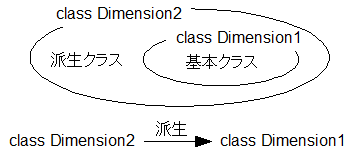
<div class="imgcenter">
<img src="//ticklerfile.blog.shinobi.jp/Img/1227497951/" border="0" alt="クラスの継承の概要図" width="357" height="156" /><br />
図：クラスの継承の概要
</div>
</p>
<p>
クラスの継承は以下のように記述する。
<pre class="code">
class Dimension2 : public Dimension1{};
</pre>
</p>
<p>
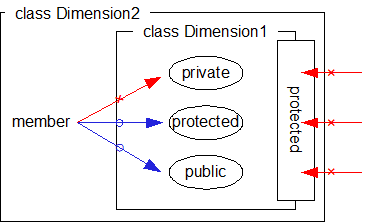
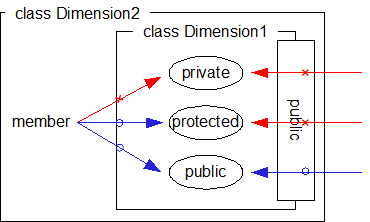
クラスのメンバのアクセス制御と同様に、クラスの継承にもprivateな継承、protectedな継承、publicな継承がある。上記の継承はpublicな継承である。privateな継承は以下のように記述する。
<pre class="code">
class Dimension2 : private Dimension1{};
</pre>
</p>
<p>
派生クラスのメンバ関数からは、基本クラスのprotectedなメンバ、およびpublicなメンバにアクセスできる。これは継承の種類によらない。
</p>
<p>
一方、派生クラス外からの基本クラスのメンバ関数へのアクセスは、継承の種類によってさらに制限される。
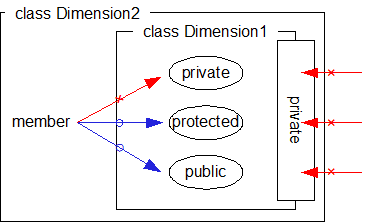
<div class="imgcenter">
<img src="//ticklerfile.blog.shinobi.jp/Img/1227497451/" border="0" alt="privateな継承" width="370" height="222" style="margin:0px auto;" /><br />
図・privateな継承
</div>
<div class="imgcenter">
<img src="//ticklerfile.blog.shinobi.jp/Img/1227497446/" border="0" alt="protectedな継承" width="370" height="222" style="margin:0 auto" /><br />
図・protectedな継承
</div>
<div class="imgcenter">
<img src="//ticklerfile.blog.shinobi.jp/Img/1227497440/" border="0" alt="publicな継承" width="370" height="222" style="margin:0 auto" /><br />
図・publicな継承
</div>
</p>
<p>
いろいろ書いたけどあってんのかな？　次もクラスの継承を少し書く予定。
</p>]]> 
    </content>
    <author>
            <name>Nina.A</name>
        </author>
  </entry>
  <entry>
    <id>ticklerfile.blog.shinobi.jp://entry/15</id>
    <link rel="alternate" type="text/html" href="http://ticklerfile.blog.shinobi.jp/%E9%9B%91%E8%A8%98/%E6%BC%94%E7%BF%92%E3%81%8C" />
    <published>2008-11-22T00:44:35+09:00</published> 
    <updated>2008-11-22T00:44:35+09:00</updated> 
    <category term="雑記" label="雑記" />
    <title>演習が</title>
    <content mode="escaped" type="text/html" xml:lang="utf-8"> 
      <![CDATA[<p>
だんだん追い詰められていきますなあ。
</p>
<p>
後で読むメモ：<br />
<a href="http://mahjong.ara3.net/etc/shanten/index.htm">向聴数計算アルゴリズム<img src="//ticklerfile.blog.shinobi.jp/Img/1225690047/" border="0" alt="Extrernal Link" width="32" height="12"/></a><br />
<a href="http://cgi.members.interq.or.jp/snake/totugeki/yybbs_2/myhonnenikkioyobisonota.cgi">再帰抜き出しによるシャンテンチェックアルゴリズム<img src="//ticklerfile.blog.shinobi.jp/Img/1225690047/" border="0" alt="Extrernal Link" width="32" height="12"/></a>
</p>]]> 
    </content>
    <author>
            <name>Nina.A</name>
        </author>
  </entry>
  <entry>
    <id>ticklerfile.blog.shinobi.jp://entry/14</id>
    <link rel="alternate" type="text/html" href="http://ticklerfile.blog.shinobi.jp/opengl/-opengl-%E7%82%B9%E3%82%84%E7%B7%9A%E3%82%92%E6%8F%8F%E7%94%BB%E3%81%99%E3%82%8B" />
    <published>2008-11-17T12:30:33+09:00</published> 
    <updated>2008-11-17T12:30:33+09:00</updated> 
    <category term="OpenGL" label="OpenGL" />
    <title>[OpenGL]点や線を描画する</title>
    <content mode="escaped" type="text/html" xml:lang="utf-8"> 
      <![CDATA[<p>
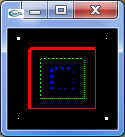
<pre class="code">
void display(void){
    // 全ピクセルクリア
    glClear(GL_COLOR_BUFFER_BIT);
    // 白色、幅0.8の方形
    glColor3f(1.0, 1.0, 1.0);
    glBegin(GL_POINTS);
        glVertex2f(0.1, 0.1);
        glVertex2f(0.9, 0.9);
    glEnd();
    glPointSize(3.0);
    glBegin(GL_POINTS);
        glVertex2f(0.9, 0.1);
        glVertex2f(0.1, 0.9);
    glEnd();
    glPointSize(1.0);
    // 赤色、幅0.6の方形
    glColor3f(1.0, 0.0, 0.0);
    glBegin(GL_LINE_STRIP);
        glVertex3f(0.2, 0.2, 0.0);
        glVertex3f(0.8, 0.2, 0.0);
        glVertex3f(0.8, 0.8, 0.0);
    glEnd();
    glLineWidth(3.0);
    glBegin(GL_LINE_STRIP);
        glVertex3f(0.8, 0.8, 0.0);
        glVertex3f(0.2, 0.8, 0.0);
        glVertex3f(0.2, 0.2, 0.0);
    glEnd();
    glLineWidth(1.0);
    // 緑色、幅0.4の方形
    glColor3f(0.0, 1.0, 0.0);
    glLineStipple(1, 0xAAAA);
    glEnable(GL_LINE_STIPPLE);
    glBegin(GL_LINE_STRIP);
        glVertex3f(0.3, 0.3, 0.0);
        glVertex3f(0.7, 0.3, 0.0);
        glVertex3f(0.7, 0.7, 0.0);
    glEnd();
    glLineStipple(2, 0xAAAA);
    glBegin(GL_LINE_STRIP);
        glVertex3f(0.7, 0.7, 0.0);
        glVertex3f(0.3, 0.7, 0.0);
        glVertex3f(0.3, 0.3, 0.0);
    glEnd();
    // 青色、幅0.2の方形
    glColor3f(0.0, 0.0, 1.0);
    glLineStipple(2, 0xA448);
    glEnable(GL_LINE_STIPPLE);
    glBegin(GL_LINE_STRIP);
        glVertex3f(0.4, 0.4, 0.0);
        glVertex3f(0.6, 0.4, 0.0);
        glVertex3f(0.6, 0.6, 0.0);
    glEnd();
    glLineWidth(3.0);
    glLineStipple(3, 0xAAAA);
    glBegin(GL_LINE_STRIP);
        glVertex3f(0.6, 0.6, 0.0);
        glVertex3f(0.4, 0.6, 0.0);
        glVertex3f(0.4, 0.4, 0.0);
    glEnd();
    glDisable(GL_LINE_STIPPLE);
    glLineWidth(1.0);
    glFlush();
}
</pre>
【実行例】<br />
<img src="//ticklerfile.blog.shinobi.jp/Img/1226890221/" border="0" width="125" height="137" alt="OpenGL実行結果" />
</p>
<p>
<dl>
<dt>■void glPointSize(GLfloat size);</dt>
<dd>
点のサイズを変更する。
</dd>
<dt>■void giLineWidth(GLfloat width);</dt>
<dd>
線の幅を変更する。
</dd>
<dt>■void glLineStipple(GLint factor, GLushort pattern);</dt>
<dd>
点線のパターンを指定する。<br />
factorはpatternの長さを拡大する。例えばpatternが010101でfactorが２であれば、これはpatternが001100110011であることと同値である。
</dd>
<dt>■void glEnable(GLenum cap);</dt>
<dd>
機能を有効にする。
</dd>
<dt>■void glDisable(GLenum cap);</dt>
<dd>
機能を無効にする。
</dd>
<dt>■GLboolean glIsEnabled(GLenum cap);</dt>
<dd>
機能が有効であるか問い合わせる。
</dd>
</dl>
</p>]]> 
    </content>
    <author>
            <name>Nina.A</name>
        </author>
  </entry>
</feed>